How to Use the AI Assistant

Every part of the assistant, in the order you would naturally use it.

Last updated:

HelpThe AI assistant

Ask about DHA Lahore in your own words, day or night, and get an answer from our own database — with the agent, the number and the original message attached. This is the complete guide: every button, and the things it will not do.

01

Opening the assistant

3
01

Where it is, and what it is

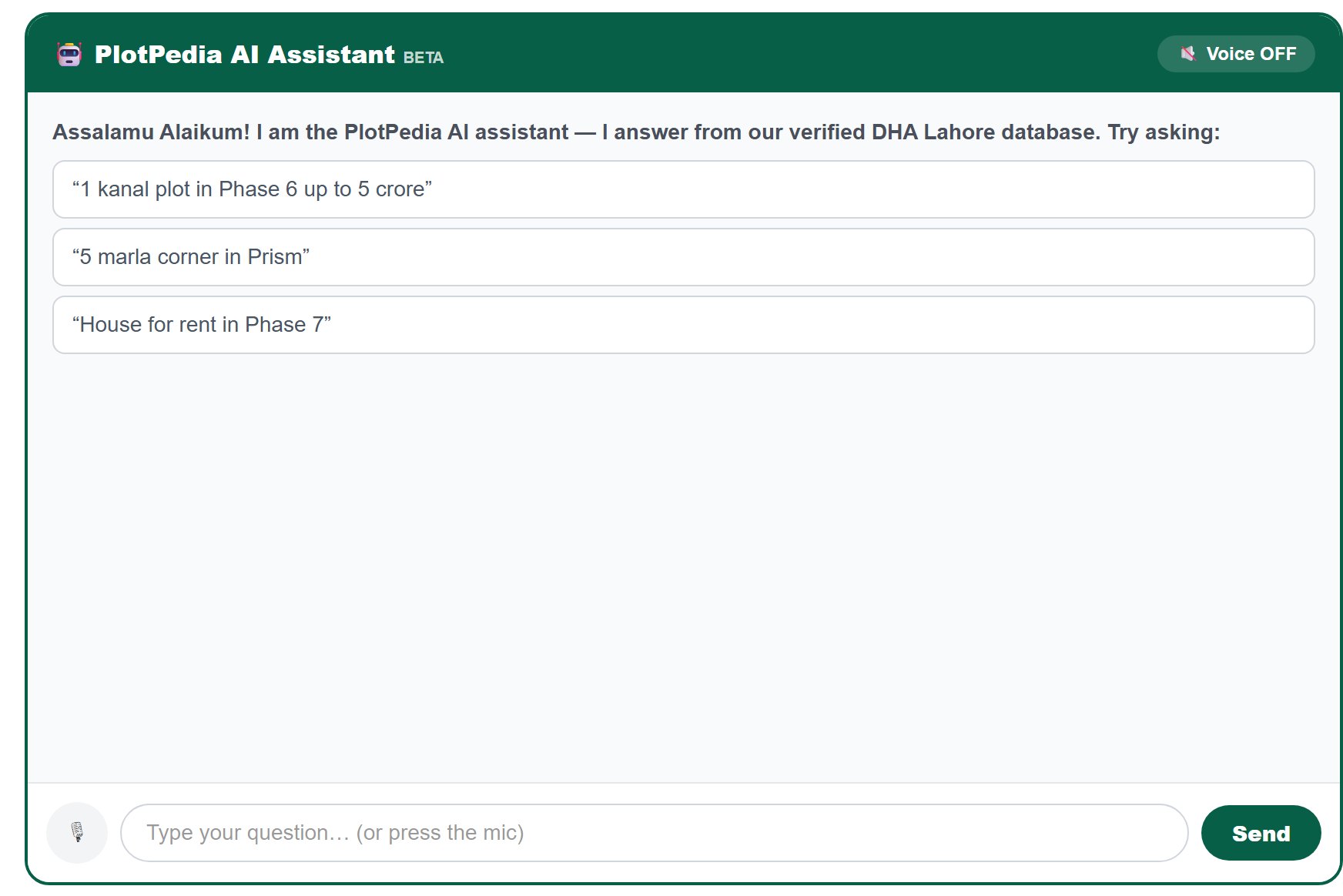
A chat box that answers about the DHA Lahore market from our own database. It is open day and night, it costs nothing, and you do not have to sign in.

  1. Open AI Assistant from the top menu, or go to /assistant/dha-lahore.
  2. A dark strip at the top carries the name and the word BETA — it is honest about being new.
  3. Under it is the conversation, and at the bottom the microphone, the box you type in, and Send.
  4. Nothing is asked of you before you can use it — no name, no number, no account.
It answers only from our own verified DHA Lahore database. It does not search the internet, and it never invents a listing.
Try it yourself
02

The three ready-made questions

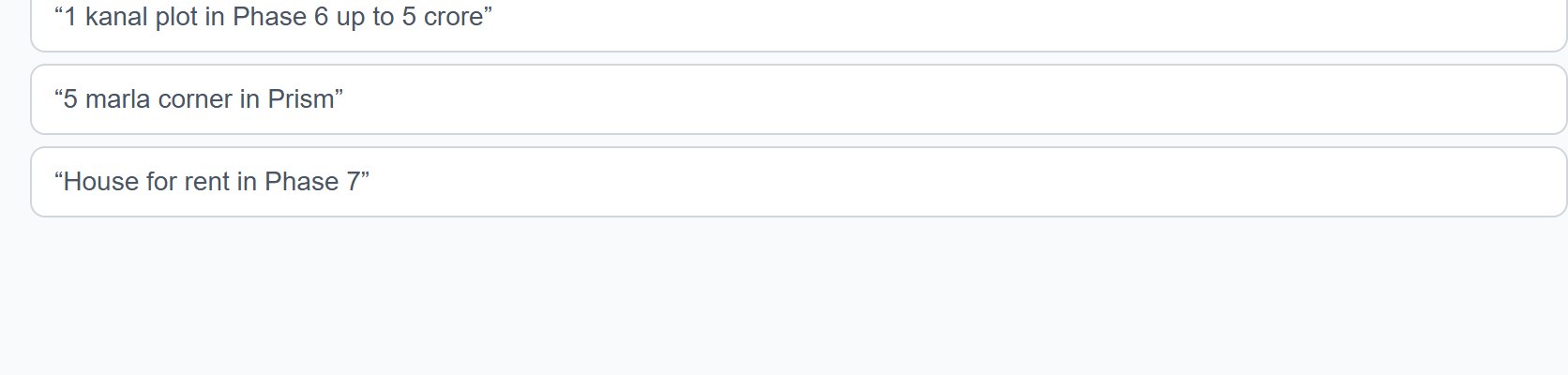
The first time you open it, three example questions sit there. They are not decoration — one tap sends that question.

  1. You see three lines in quotation marks, for example "5 marla corner in Prism".
  2. Tap any one — it is sent immediately and the answer comes back.
  3. They are there to show you the shape of a good question, not to limit you.
  4. Once you ask your own question they disappear and the conversation begins.
Try it yourself
03

Asking, and how the conversation looks

Your question and its answer stack up like any chat. Everything stays on the screen so you can compare answers.

  1. Type in the box at the bottom and press Send, or just press the Enter key.
  2. Your question appears on the right in the site colour; the answer appears on the left in white.
  3. While it is working, typing… shows under the last message.
  4. Ask as many questions as you like — the whole conversation stays on screen and scrolls with you.
Try it yourself
02

Asking well

4
04

Write a sentence, the way you would say it

You do not have to learn any special words. The assistant reads a plain sentence and turns it into a real search.

  1. Write, for example, Phase 6 mein 1 kanal ka plot 5 crore tak.
  2. English and Roman Urdu both work, and you can mix them in one sentence.
  3. Numbers written as words work too: one kanal, ek kanal, do marla.
  4. Filler words are ignored on purpose — dha, lahore, mein, mujhe, chahiye.
This is the same brain that runs the search on the All Properties page. Whatever works there works here, and the rules are identical.
Try it yourself
05

Everything it understands

The full list. If a word is here, it becomes a real filter — not a guess.

  1. Mix as many as you like in one sentence, in any order.
What you writeWhat it becomes
phase 9 · 9Phase 9 Prism — the DHA rule: 9 on its own always means Prism
9 town · 9townPhase 9 Town
prism · rahbar · emePhase 9 Prism · Phase 11 · Phase 12
phase 1 to 13that phase
5 marla · 1 kanal · 20 marlathat size
3 crore tak · under 2 crore · 90 lakhprice up to that
3 bed · 4 bedrooms · kamraythat many beds or more (homes only)
plot · file · ghar / house · commercial / shop / plazathat property type
rent · kirayaswitches to rent
corner · park / facing park · main road · possession · balloted · level · pair · installmentthat feature
block c · c block · block 4qthat block
Ask about anything outside DHA Lahore and it will simply have nothing to show you — it only holds this one market.
Try it yourself
06

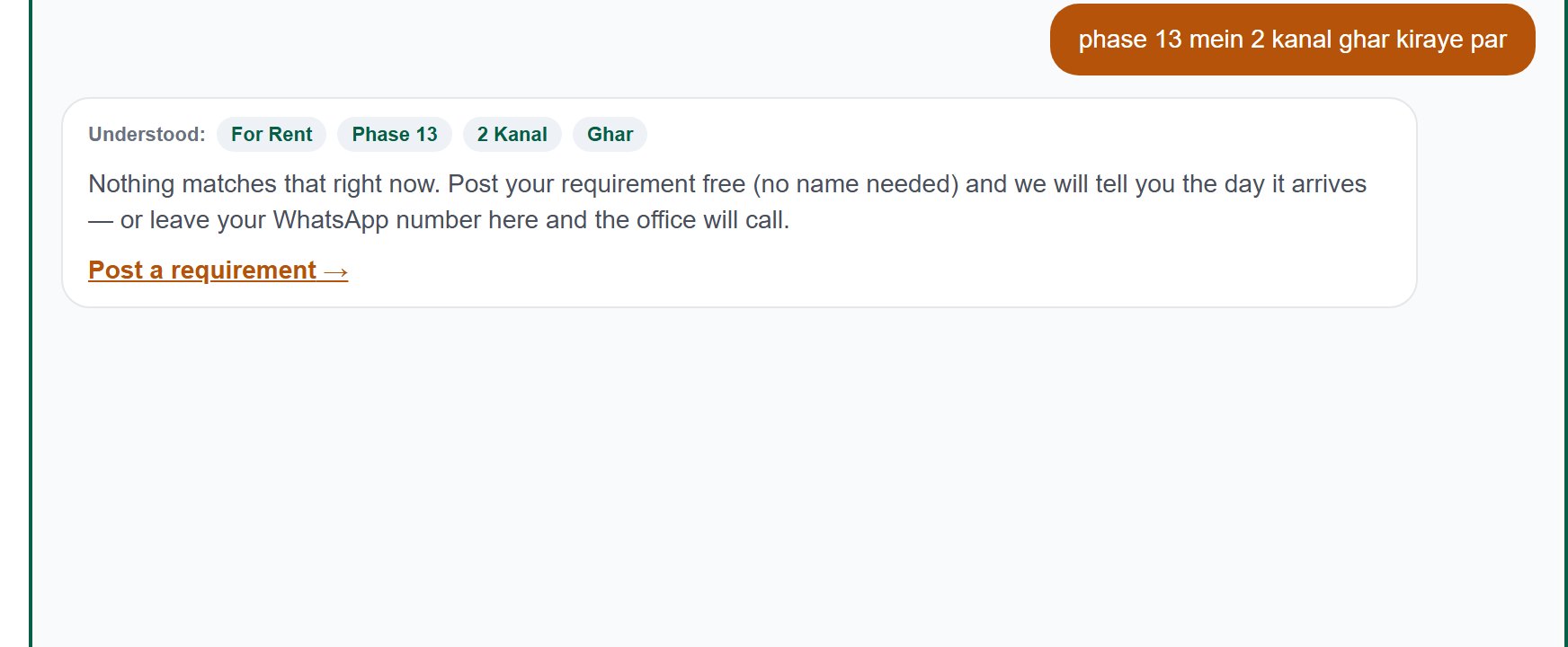
The "Understood" chips — check these first

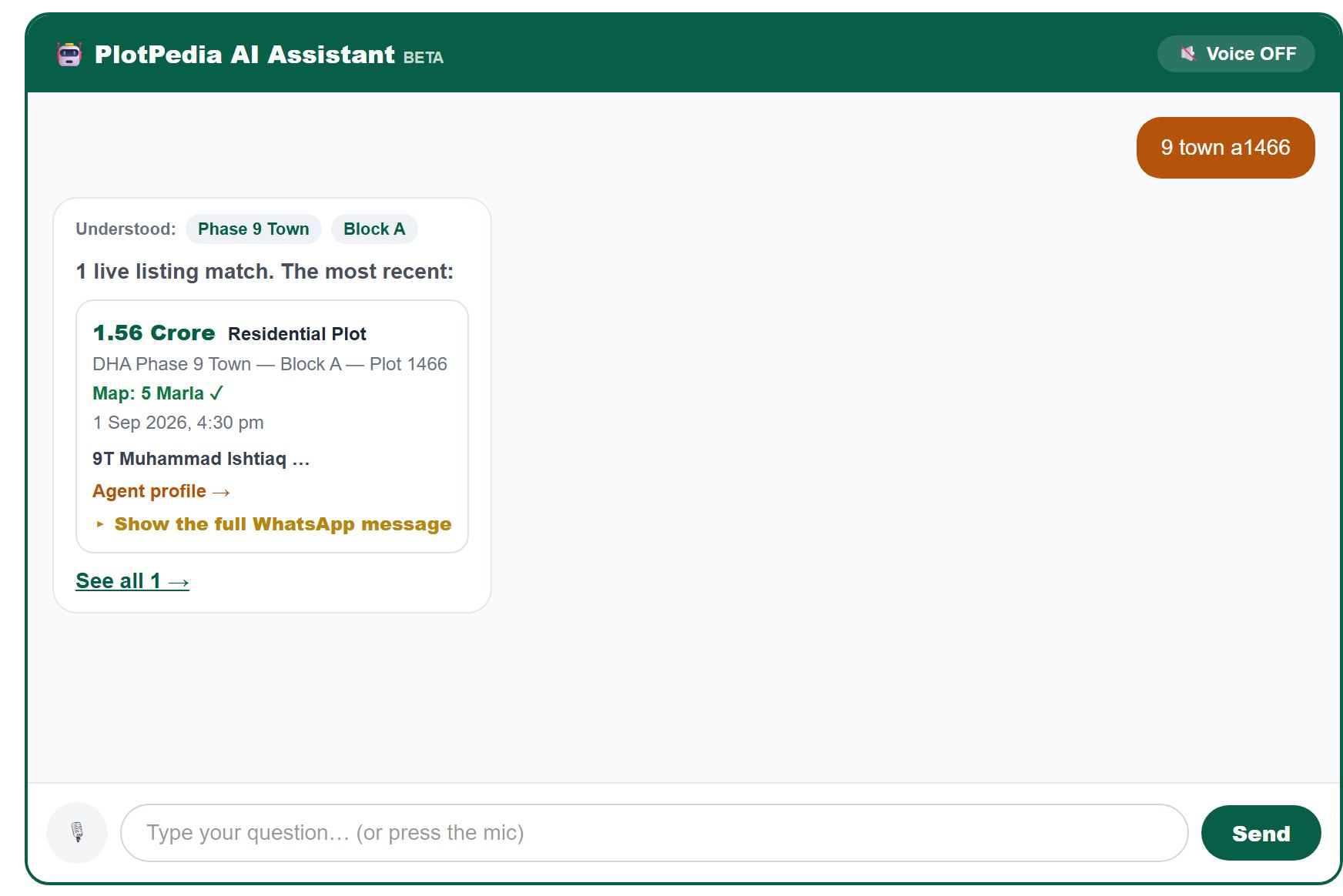
Before the listings, the assistant shows you exactly what it thought you asked for. Every wrong answer starts here, so read this line first.

  1. Under your question a row of small chips appears after Understood:.
  2. Ask phase 9 facing park plots and you should see three chips: Phase 9 Prism, Plot, Park-facing.
  3. A chip missing means it did not understand that part — write it more plainly and ask again.
  4. A chip wrong means it misread you — say it differently, for example 9 town instead of 9.
Try it yourself
07

When you did not ask for a size

A small line that stops a common misunderstanding: that the assistant chose a size for you.

  1. Ask something without a size, for example phase 9 facing park plots.
  2. Under the count you see the sizes in the answer: 1 Kanal (154) · 5 Marla (41) · 10 Marla (14)…
  3. And then plainly: You did not ask for a size — every size is included.
  4. If you did ask for a size, this line does not appear at all — there is nothing to explain.
This line exists because of a real complaint: the old assistant always showed the cheapest listings, which were always the smallest, and it looked as if it had decided the size by itself.
Try it yourself
03

Reading the answer

6
08

How many, and the freshest first

The answer opens with a count and then shows you the most recently seen listings — not the cheapest.

  1. You see, for example, 247 live listings match. The most recent:
  2. Up to six listings follow, newest first.
  3. The count is every listing that matches, not only the six shown.
  4. Freshest first is deliberate: in this market a listing seen today is far more likely to still be available.
Try it yourself
09

What every listing shows

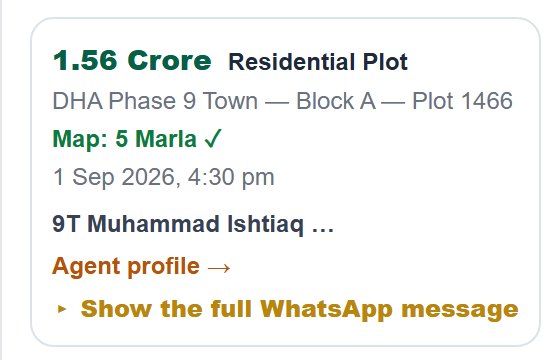
Each listing in the answer is a small card. It carries the same facts as a card on the All Properties page — nothing is hidden to make you ask.

On the cardWhat it means
PriceThe asking price in Crore or Lakh; where none was stated, Price: ask
TitlePress it to open that plot own page
DHA Phase — Block — PlotExactly where it is
Map: 5 Marla ✓The size in DHA own record. In gold with the agent wrote… when the two disagree
Date and timeWhen the listing was last seen in the market
Agent namePress it for that agent full profile
WhatsApp + numberOne press and you are writing to them
Show the full WhatsApp messageThe dealer original message, word for word
Try it yourself
10

The agent, and his profile

Every listing carries the name of the person behind it — not a hidden contact you have to earn.

  1. The agent or agency name sits under the date.
  2. Press the name, or Agent profile → below it, to open his full page.
  3. There you see all his live listings, his record and what people have said about him.
  4. Where no name is known, the listing still shows the number — usually the owner himself.
Numbers are shown openly on this site. We never hide a number to make you pay for it.
Try it yourself
11

The full WhatsApp message

The most useful line in the answer, and the one most people never open. It is the dealer own message, untouched.

  1. On listings that came from WhatsApp, a gold line reads Show the full WhatsApp message.
  2. Press it and the original message opens underneath.
  3. Inside there is usually far more than the card holds: other plots in the same block, the real reason for the price, DP pole, dues, possession.
  4. Press again to close it.
We do not edit or shorten these messages. You read exactly what the dealer wrote — including the parts that do not flatter the plot.
Try it yourself
12

The map size, and when it disagrees

The line that protects you. It shows the size according to DHA own record, not according to the agent.

  1. In green: Map: 5 Marla ✓ — the DHA record and the agent agree.
  2. In gold: Map: 10 Marla · the agent wrote 1 Kanal — they do not agree, and you are shown both.
  3. We never hide the disagreement and never quietly take the agent side.
  4. When this line is gold, ask the agent about it before anything else.
The rule on this site: DHA own record is final. Every size — in the search, in the price per marla, and on this line — is measured against that record first.
Try it yourself
13

See all of them

Six listings are a taste. The link at the bottom hands the whole search over to the proper search page.

  1. At the end of the answer there is See all 247 →.
  2. Press it and the All Properties page opens with your question already turned into filters.
  3. There you get all the listings, the nine filters, the map beside the list, sorting and comparison.
  4. Use the assistant to find your requirement quickly; use that page to work through it.
Try it yourself
04

Talking to it

2
14

Ask by voice

For anyone who would rather speak than type. The microphone is at the bottom left.

  1. Press the 🎙 button. It turns red and starts listening.
  2. Say your question the way you would say it to a person.
  3. When you stop, it is sent by itself — you do not press anything else.
  4. Nothing is recorded or kept; only the words go through, and they go to us, not to any outside service.
Voice needs Chrome. On any other browser you are told plainly to type instead — it does not fail silently.
Try it yourself
15

Listen to the answer

The assistant can read its answer out loud — useful when you are driving or your hands are busy.

  1. At the top right of the dark strip is 🔇 Voice OFF.
  2. Press it once — it becomes 🔊 Voice ON and every new answer is read aloud.
  3. It reads a short summary, not every listing — a list of six read out would be useless.
  4. Press again to switch it off. It stays off until you turn it back on.
The voice is your own browser free one. It is not perfect at Urdu names — that is the browser, not the answer.
Try it yourself
05

When nothing matches

2
16

Leaving your number

If you would rather have a person call you, just write your number into the chat. Nothing else is needed.

  1. Type your WhatsApp number in the box, for example 0300 1234567, and send it.
  2. The assistant stops searching and simply confirms: your number is saved and the office will contact you.
  3. You can carry on asking questions afterwards — the conversation does not end.
  4. Your number goes to our office only. It is never shown to an agent and never sold.
Try it yourself
17

Nothing found — the two ways out

An empty answer is still an honest answer, and it comes with two ways forward.

  1. The assistant says plainly that there is no live listing like that right now.
  2. Post a requirement — leave what you want, free and without a name, and we tell you the day it arrives.
  3. Or write your WhatsApp number right there and the office will call.
  4. You can also simply ask again with one condition removed — drop the chip, the size or the budget.
It will never invent a listing to fill an empty answer. If it has nothing, it says so.
Try it yourself
06

Language and limits

3
18

Three languages

The assistant answers in whichever language the site is set to — and it does not mix them.

  1. Use the language switcher at the top of the site: English, Roman Urdu or اردو.
  2. Every line of the answer changes with it — the chips, the counts, the buttons.
  3. You may ask in one language and read in another; the question is understood either way.
  4. English is what the site opens in; your choice is remembered for next time.
One language per page, never two mixed in the same sentence. That is a rule on this site, not an accident.
Try it yourself
19

Asking a lot at once

There is a limit, and it is deliberately generous — you will only meet it if something is wrong.

  1. Up to 150 questions in five minutes from one place.
  2. Past that it says plainly: Too many questions at once — please wait a moment.
  3. Wait a minute and carry on; nothing is lost and the conversation stays.
  4. The limit is there so one machine cannot slow the assistant down for everybody else.
Try it yourself
20

When to use the search page instead

The assistant is for asking. The All Properties page is for working. Knowing which to open saves time.

  1. Use the assistant when you want a quick answer in plain words, or you are on a phone, or you would rather speak.
  2. Use All Properties when you want to go through everything: nine filters, the map beside the list, sorting, saving and comparing.
  3. Both run on exactly the same brain and the same database, so neither will contradict the other.
  4. The See all → link at the end of every answer moves you from one to the other without losing your question.
Try it yourself
07

Your conversation, and when things go wrong

2
21

What happens to what you type

You should know where your words go. Nothing here is hidden from you.

  1. Every question and its answer is kept in our own office record — so we can see what people are looking for and cannot find.
  2. Your name is never asked. Nothing identifies you unless you yourself write your number.
  3. Nothing is shared with any agent, and nothing is sold to anybody.
  4. Nothing leaves our own server — no outside AI service ever sees your question.
  5. Refresh the page and the screen clears; the conversation starts fresh.
If you write your WhatsApp number, that number is saved with the conversation so our office can call you back about the right thing. That is the only time you are identifiable.
Try it yourself
22

When the answer does not come

Sometimes the line breaks. The assistant says so plainly instead of sitting there silent.

  1. If the connection fails you see: Sorry — could not connect, please try again.
  2. Your question stays on screen. Just ask again; nothing was lost.
  3. If it happens again and again, the site itself is having trouble — try after a few minutes.
  4. If the microphone is not available you are told to use Chrome or to type — it never fails silently.
It will always tell you what went wrong. A silent empty box is a bug, not the design.
Try it yourself
08

What the assistant will not do

10

An honest list. Knowing these saves you from expecting something that is not there.

  • It does not close a deal. It finds and it explains; a human being always closes.
  • It answers only from our own DHA Lahore database — it does not search the internet and it never invents a listing.
  • It knows DHA Lahore only. Ask about another city or society and it has nothing to show.
  • It does not give advice on whether a price is good. It shows you the facts and the market; the judgement is yours.
  • It shows no photos — for photos open the listing own page.
  • It shows at most six listings; the rest are behind See all.
  • It cannot verify every claim an agent makes. It checks the size against the DHA record and shows you the original message — that is as far as certainty goes.
  • Voice needs Chrome; on other browsers you type.
  • The spoken answer is a short summary, not the listings.
  • It does not remember you between visits. Each visit starts fresh — nothing about you is kept.

This guide describes the assistant exactly as it works today. When it learns something new, this page is updated with it. 22 functions